
Weather forecast
Ask Growi for the weather forecast and you get a forecast card for today and the days after it, seven days at most. Ask what to pay attention to in the coming days and you get at most five pieces of advice, as text, without the card. Warnings such as frost risk are in Growi’s text, not on the card.
How it works
Section titled “How it works”The forecast card
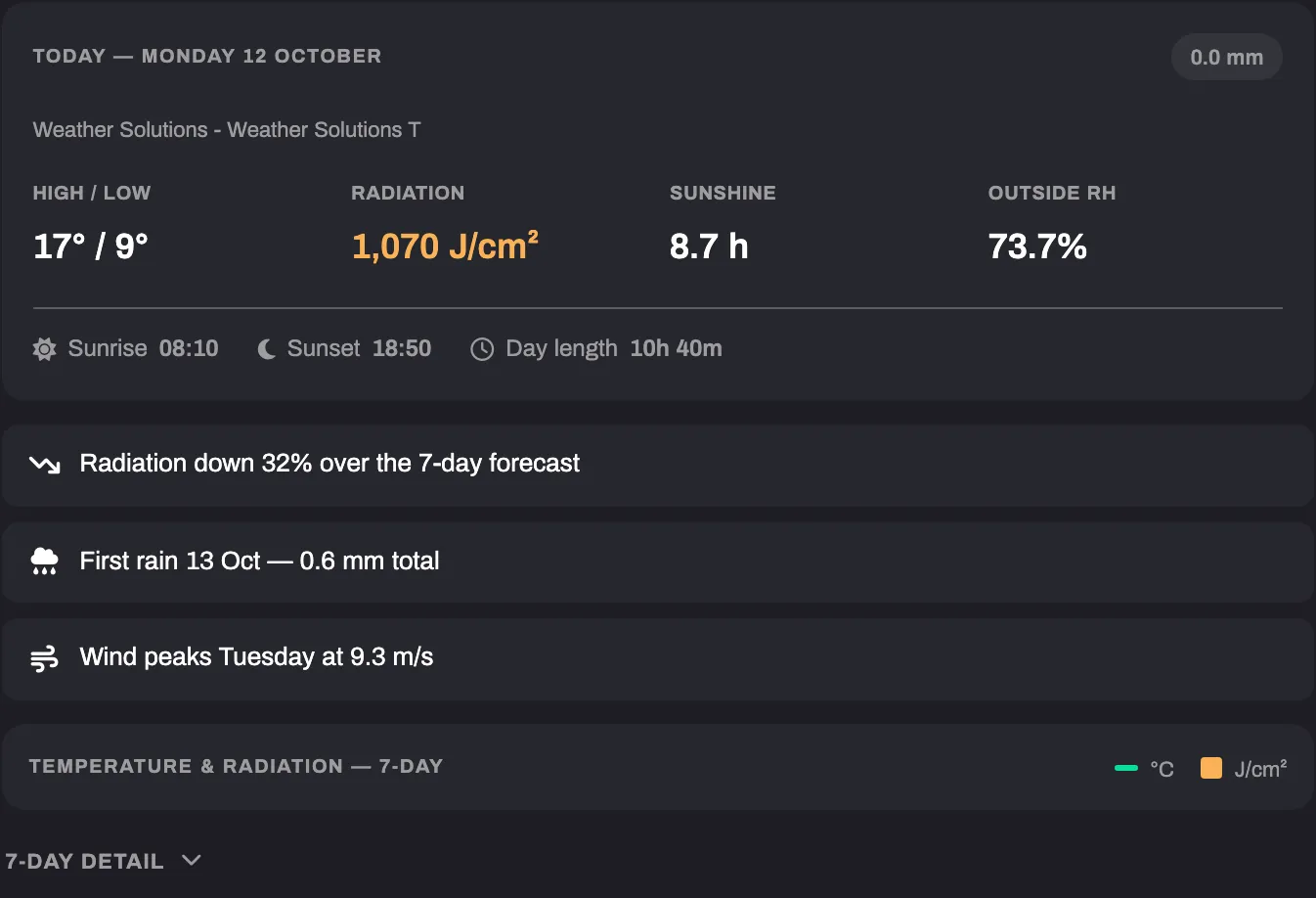
Section titled “The forecast card”The card appears when you ask for the weather forecast itself, for example “What’s the weather this week?”. You get all seven days unless you ask for a shorter period. Every day is a whole day, today included. When the forecast does not cover the last day in full, that day is left out and Growi names the number of days it got.
The forecast comes from the Weather Solutions module linked to the selected crop. When there are several to choose from, Growi names them, for example “Weather Solutions - Greenhouse 1”, and asks which one you mean. The card names the source it was read from, under the date.
| Part of the card | What it shows |
|---|---|
| Today | The date, the rain total in mm, the source, High / low, Radiation, Sunshine, Outside RH, Sunrise, Sunset and Day length |
| Insights | Up to three lines over the days on the card: radiation going up or down, the first rain or no rain, and the day the wind peaks |
| Chart | Bars for the daily radiation sum in J/cm² and a line for the daily maximum temperature, for every day on the card |
| Day detail | A button labelled with the number of days, for example 7-Day detail. Closed when the card appears. Click it for a table of every day on the card: Date, Rad (J/cm²), Temp (°C) (daily maximum), RH (%) (daily average), Rain (mm) and Wind (m/s) (daily maximum) |
Sunshine counts the time that radiation is above 120 W/m². Sunrise and Sunset are the first and the last moment of the day for which the forecast expects any outdoor radiation, so they move with the forecast cloud cover. When the forecast does not cover the whole day, the card shows a dash for them and for Day length. With the card on screen, Growi does not repeat the numbers per day.
What Growi flags in its text
Section titled “What Growi flags in its text”| Flag | When |
|---|---|
| Frost risk | The lowest minimum temperature is below 5 °C |
| Cool nights | Otherwise, the lowest minimum is below 10 °C |
| Warm days | The highest maximum temperature is above 25 °C |
| Strong wind | The highest daily maximum wind is above 11.1 m/s |
| High radiation | The highest daily radiation sum is above 2,000 J/cm² |
Advice for the coming days
Section titled “Advice for the coming days”Ask what to pay attention to or do in the coming days, what to expect, or for an outlook. This needs one selected crop. See Choosing a crop.
Growi reads the forecast without showing the card, and your temperature, RH, CO2, VPD and drain of the last seven days, so yesterday is the reference and the trend shows what is emerging. It weighs the stage of the crop from its planting date and expected end date. The answer is a list of at most five recommendations, fewer when fewer are worth saying. Each one points to a trend, a deviation or a forecast condition in that data, with numbers where they help.
A request for a document, such as a summary, or for one value, such as a yield or energy prediction, is not advice. Growi answers it directly.
Limitations
Section titled “Limitations”- The card does not show current conditions, cloud cover, a condition such as rain, or the minimum temperature of the days after today. Growi can use those in the text.
- Without a Weather Solutions module in the account, Growi tells you the account has no weather forecast source and points you to LetsGrow support. No card is shown. When the source cannot be read at that moment, Growi says so and answers from indoor data.
- A question about past outside weather is answered from your weather station data. See Asking about your data.